

Blog
How to add Hindi and Hinglish captions to a video
Add Hindi, Hinglish or English captions to a video in a few steps: choose how they are written, pick a look, fix any word and export.
In short: Open the Captions tool in Muvomi, add your video and press Auto-caption. Then pick how you want the Hindi written: in Devanagari, in English letters (Hinglish), or translated into English. Choose a look, fix any wrong words and export. It takes a few minutes.
Plenty of people watch Reels and Shorts with the sound off, so the captions end up doing the talking. For Hindi, the first decision is how to write them. Some viewers read Devanagari with no trouble. Many others type and read Hindi in English letters on their phones, the way they text friends. That's Hinglish. Muvomi can write either one from the same recording, so you don't have to guess up front.
Which writing should you pick?
You can switch between the three whenever you like. The captions are written again straight away, and the video isn't listened to a second time. Here is one spoken line in each.
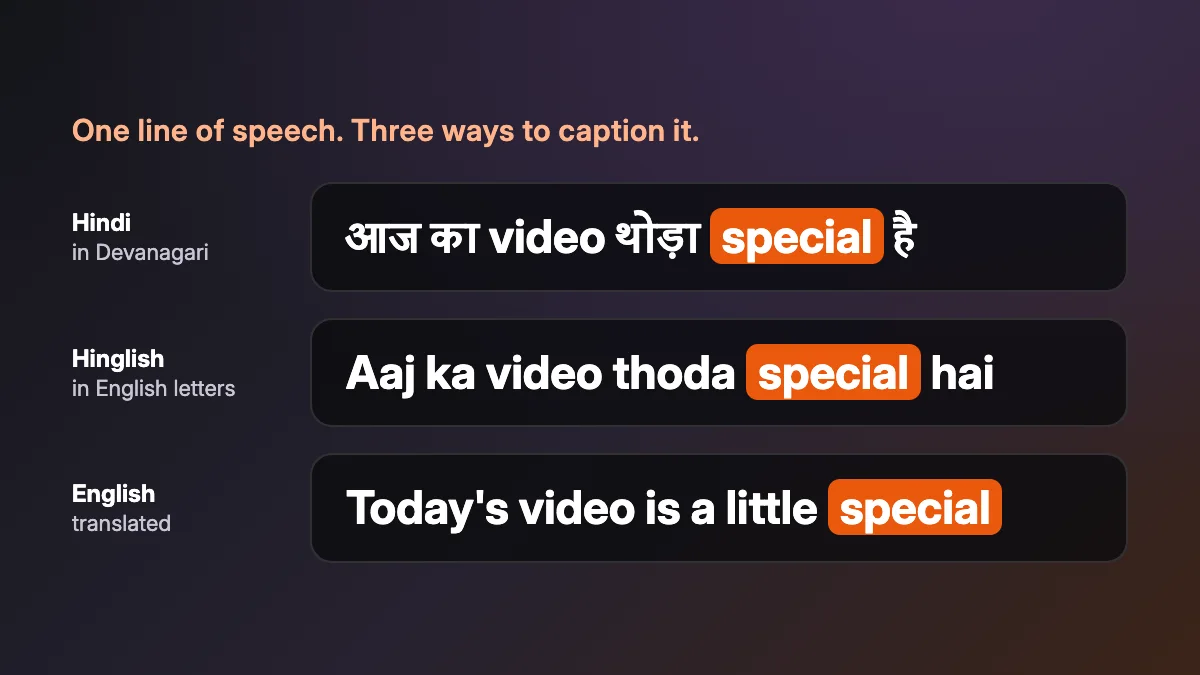
| Writing | Example | Pick it when |
|---|---|---|
| Hindi in Devanagari | आज का video थोड़ा special है | your audience reads Hindi script without effort |
| Hinglish in English letters | Aaj ka video thoda special hai | your audience texts in Hinglish |
| English translation | Today's video is a little special | you want people who don't speak Hindi to follow along |
English words that speakers mix into their Hindi stay in English letters in all three, just as they were said. The Hindi captions page plays this exact line in each writing, if you'd like to see it move.
How to add the captions
- Open the video editor in the studio and add your video. If you don't have an account yet, start free.
- Open Captions. Leave Language on Auto and Muvomi works out the language from the voice. If you already know it's Hindi, you can choose it yourself.
- Press Auto-caption. The speech turns into captions on the timeline, and each word keeps its own start and end time.
- Choose the writing: Hindi in Devanagari, Hinglish, or English.
- Pick a look from the 87 caption templates. Some of them light up each word as it's spoken.
- Read through the list next to the preview and fix anything that's wrong. Names are the usual culprit. You can also change when a caption starts and ends.
- Set the colour, the position (top, middle or bottom) and the size. Then export the video, or download the captions on their own as an SRT or VTT file.
Picking a look people can read
Captions only help if people can read them in the time they're on screen. Muvomi breaks them at the end of a sentence, at commas and at pauses, and keeps each one to about 34 characters and seven words. You won't get a wall of text.

- If the speaker talks fast, use a look that highlights each word. It helps the eye keep up.
- Keep captions in the middle or lower down, away from where apps draw their own buttons.
- Size runs from 60% to 160%. Go bigger for phones.
Getting the words right
Automatic captions are a fast first pass, and a few habits make them better.
- Start with clear audio. Music or noise over the voice makes mistakes more likely.
- Check names, places and brand words first. Nobody can guess those.
- Watch it once with the sound on. If you fix a word without changing how many words there are, it keeps its original timing.
FAQs
Questions about this guide
Can I get Hinglish captions?
Yes. Hinglish is Hindi written in English letters, and it's one of the three ways Muvomi writes Hindi captions. The other two are Devanagari and an English translation. There's more on the languages page.
What if the speaker switches between Hindi and English?
That's how most people talk, and Auto handles it. The English words stay in English letters, as they were said.
Do I need an account?
Yes, a free one. No card needed. The pricing page shows what Free includes and what credits cost.
Which other languages can I caption?
51, including Tamil, Telugu, Bengali, Marathi and Gujarati. Each one can be written in its own script or in English letters.
Keep going
Related pages
The Captions tool
Auto-caption a video in one press.
Hindi captions
The same line in three writings, playing.
Caption templates
87 looks, each one playing.
How to dub a video into Telugu, Tamil or Hindi
Say the video again in another language.
Try it on your own video.
Free to start, with no card needed.