

For creators
AI video tools for creators who post in more than one language
One studio for the whole job: write a short from an idea, cut and caption your own recordings, and dub a finished video so a new audience can watch it in their language.
Last updated
What you can make
The work, and the tool for each part of it.
- AI Shorts
Make a short from one idea
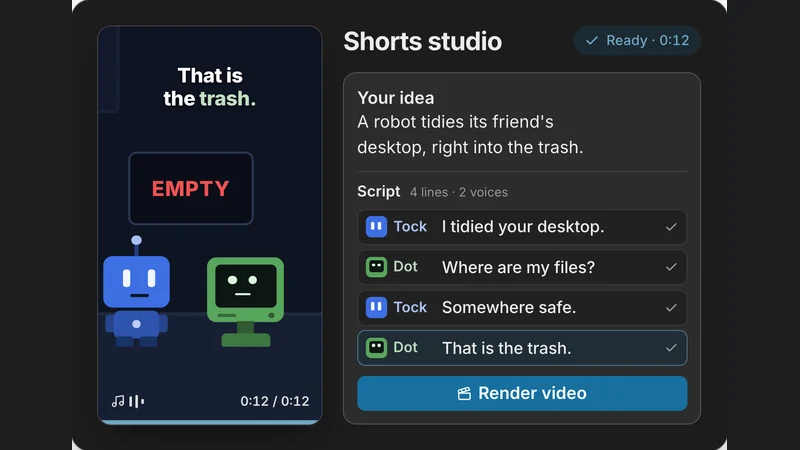
Type an idea and AI Shorts writes a skit for two or three characters, gives each a voice, captions every line and scores it, as an upright 9:16 film for Reels, Shorts and TikTok. Change any line before you export.
What AI Shorts does - Captions & Transcription
Caption the way your audience reads
Auto captions are timed to every spoken word in 51 languages, written in the language's own script or in English letters like Hinglish and Tanglish. Pick one of 87 looks, or export SRT and VTT files for YouTube.
What Captions & Transcription does - AI Dubbing
Dub a video for a new audience
Paste a YouTube link or upload the file, and AI dubbing says it again in one of 92 languages, 13 of them Indian, with a voice close to each speaker's and your music left as it was.
What AI Dubbing does - Audio Cleanup
Fix the sound of a recording
Audio cleanup takes out background noise and hum, evens out the loudness, and cuts long silences and filler words such as um and uh from a talking-head clip.
What Audio Cleanup does - Video Editor
Edit without installing anything
Trim, split and arrange clips on a multitrack timeline in the online video editor, add titles and music, and export an MP4 up to 4K.
What Video Editor does - Design Editor
Thumbnails and posts
Describe a thumbnail and Design Studio makes an editable design at 1280 × 720, with every layer yours to change, then export a PNG.
What Design Editor does
One recording, three languages
From one recording to a video in three languages.
Bring in your recording
Drop an MP4 or WebM of up to 10 minutes into the video editor.
Clean it up
Remove the hum and the room noise, level the loudness, and cut the filler words.
Caption it
Caption it in Hindi script or in Hinglish, choose a look, and export the MP4 with its SRT.
Dub it
Upload the finished video to AI dubbing and have it said again in Telugu and Tamil, each version with its own subtitles.
Questions
What creators ask us.
Can I use Muvomi for YouTube videos?
Yes. The editor exports wide 16:9 and upright 9:16 MP4s up to 4K, captions come as SRT or VTT files that YouTube accepts, and Design Studio has a 1280 × 720 thumbnail size.
Does Muvomi make Hinglish captions?
Yes. Hindi speech can be captioned in Devanagari with the English words kept, in Hinglish written in English letters, or as an English translation. Hindi captions shows real captions the app made, and the same is done for 14 Indian languages.
Can I dub someone else's YouTube video?
Only a video you have the right to dub. Before a dub starts you confirm that you may dub the video and the people who speak in it, and that is kept with the dub.
How much does it cost to start?
A new account gets 100 credits free, once, at sign-up; exports made with them carry a Muvomi watermark and are up to 720p. More credits are bought once, from $5 for 500 credits, and stay in your account until you use them; while you have credits you bought, exports have no watermark and go up to 1080p free, or 4K for 5 credits. There is no subscription. Your first dub of a video up to 30 seconds is free. Pricing lists what each tool uses.
Do I keep the rights to what I make?
Yes. You keep the rights in what you make, and Muvomi does not use it to train AI models. The Privacy Policy has the detail.
Also made with Muvomi
The same studio, other kinds of work.
Teachers and course creators
Explainer films from a lesson, and captions and dubs in your learners' languages.
Small businesses
A product film from your website, posts in your colours, and ads in your customers' language.
Marketing teams and agencies
One master video, dubbed and captioned for every market, and kept on brand.
Keep exploring
Where to next?
Auto captions
Captions timed to every spoken word, in many languages.
AI Video Dubbing
Say a video again in another language.
Caption languages
Captions in Hindi, Tamil, Telugu and many more.
Add Hindi and Hinglish captions
A step-by-step guide from the blog.
Dub a video into Telugu, Tamil or Hindi
A step-by-step guide from the blog.
Pricing
Start free. Buy credits when you need more.